

Introducing Bingeo TV Stick
Truly, we have had this moment: sitting in front of an older TV, flipping through a limited channel lineup, while knowing that better content exists somewhere out there. Can Bingeo TV Stick make any difference?
Oftentimes. Buying a brand-new smart TV seems like the obvious fix, but that means spending hundreds of dollars on hardware you may not actually need.
That’s where streaming sticks come in. Over the past few years, these small plug-in devices have quietly become one of the most practical tech purchases around. They promise to breathe new life into older televisions without the need for a replacement.
Bingeo is one of the newer names entering this space, and it’s been getting some attention lately.
So, what exactly is Bingeo? Is it worth the money? Does it actually do what it claims?
These are fair questions. The market for streaming devices is crowded, and bold claims are everywhere. Rather than just repeating what the product page says, this review breaks down what Bingeo is, how it works, and whether it makes sense for everyday use.
One thing worth saying upfront: no streaming stick is a magic solution for everyone. However, for the right person, someone with a working older TV who simply wants access to modern streaming, Bingeo checks more boxes than you might expect. The real question is whether it checks your boxes specifically. Let’s get into it.
What Is Bingeo?
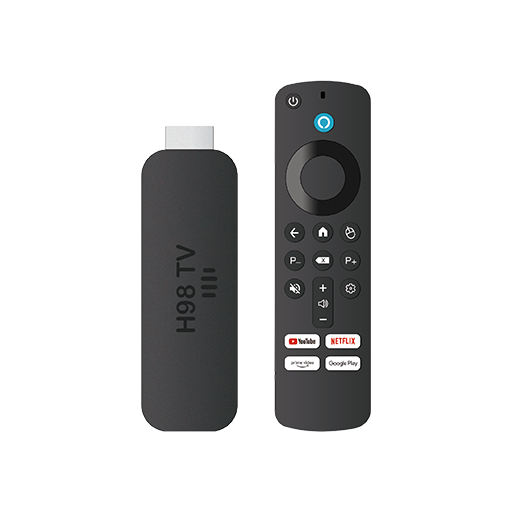
Bingeo is a compact streaming stick designed to plug directly into the HDMI port of any compatible television. Once connected and set up, it effectively converts a standard TV into a smart TV by giving it access to streaming apps, internet connectivity, and a voice-controlled interface.
At its core, Bingeo is an Android-based media device. It runs on Android 14.0, which is one of the more recent versions of the operating system. This matters because newer Android versions tend to support a wider range of apps and receive better long-term software compatibility.
The device itself is small, compact enough to carry in a bag or pocket. That portability is part of the appeal. Unlike a full set-top box, Bingeo sits flush with the back of the TV and doesn’t take up shelf space or require extra cables beyond the HDMI connection and a power source.
Bingeo comes with a voice remote which allows users to search for content, launch apps, and navigate menus without having to type manually using an on-screen keyboard.
More About Bingeo
The device connects to the internet via WiFi. There’s no need for an ethernet cable or any wired setup. Once connected to a network, users can access streaming platforms, entertainment apps, and other content available through the Android ecosystem.
In terms of playback, Bingeo supports up to 10K Ultra HD resolution. This is the highest tier of video quality currently marketed in consumer devices, though the actual visual output will depend heavily on the content source, the TV’s own display capabilities, and the internet connection speed.
Basically, Bingeo is not a subscription service. The device itself is a one-time purchase. After that, users access whichever streaming platforms they already subscribe to or free services that don’t require subscriptions at all. There are no mandatory recurring fees tied to Bingeo itself.
In short, Bingeo is a hardware tool designed to solve a very specific problem: making older or basic TVs capable of doing what modern smart TVs do out of the box.
Product Specification
- Dimensions: 1.40 by 1.10 by 0.51 inches and 2.60 by 1.40 by 0.51 inches
- Receiver plug: HDMI
- Power supply: 5V/2A
- Resolution: 1080/60Hz
- Shell Material: ABS
- Starting Price: $74.95
Does Bingeo Work? The Technology Behind It
To understand why Bingeo works, it helps to understand what actually makes a TV “smart” in the first place and what it lacks when it isn’t.
What a Smart TV Really Is
A smart TV is simply a television with a built-in computer. That internal processor runs an operating system, connects to the internet, and supports applications. Without those components, a TV can only display signals fed to it from an external source, like a cable box or a DVD player.
Obviously, Bingeo is, essentially, that missing computer. By plugging into the HDMI port, it feeds a full smart TV interface into any television that accepts an HDMI signal.
The Role of Android 14.0
The operating system is the backbone of what Bingeo can do. Android 14.0 is the same OS platform used across millions of smartphones and tablets worldwide. It’s mature, well-supported, and capable of running a wide ecosystem of apps.
Because Bingeo uses Android, it taps into the Google Play Store framework for app access. This means the device can support popular streaming services, games, utilities, and other entertainment tools, essentially anything compatible with the Android TV environment.
Android 14.0 specifically brings performance improvements over earlier versions, better memory management, and enhanced security features. For a streaming stick, this translates to smoother app loading, more reliable background processing, and generally fewer crashes or slowdowns during use.
How HDMI Carries the Signal
The HDMI (High-Definition Multimedia Interface) standard is the key physical connection that makes all of this possible. When Bingeo is plugged into a TV’s HDMI port, it takes control of that input channel and sends both audio and video signals directly to the display.
HDMI supports very high-bandwidth data transfer. Modern HDMI versions (2.0 and above) can carry 4K and even 8K video signals alongside multi-channel audio all through a single cable connection. The TV, in this scenario, acts purely as a monitor. It receives and displays whatever the HDMI device sends it.
WiFi Connectivity and Streaming
Streaming is the process of receiving and playing back media in real time over the internet, rather than playing locally stored files. For streaming to work smoothly, two things are necessary: a reliable internet connection and a processor fast enough to decode the incoming data.
Bingeo connects to home WiFi networks. Once connected, it communicates with streaming servers around the world — pulling in video and audio data and processing it for display. The faster the internet connection and the stronger the WiFi signal, the smoother the experience.
Most streaming platforms use adaptive bitrate technology, which automatically adjusts video quality based on available bandwidth. So even with a slower connection, content will often continue playing — just at a lower resolution until the connection improves.
How Voice Control Works In Bingeo
The included voice remote uses a microphone to capture spoken commands. These are either processed locally or sent to a connected service (depending on the implementation) and translated into actions — launching an app, searching for a title, adjusting volume, and so on.
Voice search removes one of the biggest friction points of older TV interfaces: the on-screen keyboard. Instead of navigating letter by letter with a directional pad, a user simply says what they want. The system interprets natural language and executes the command.
Ultra HD Playback: What 10K Actually Means
The “10K” designation refers to horizontal pixel resolution. For context: 1080p (Full HD) has roughly 1,920 horizontal pixels; 4K has around 3,840; 8K has around 7,680; and 10K sits above that. In practice, consumer-grade streaming content currently maxes out at 4K for most services.
The practical implication is that Bingeo’s hardware is capable of handling very high-resolution video without bottlenecking the output. Whether you see a noticeable difference will depend on your TV’s panel resolution and how close you sit to it. But from a technical standpoint, having headroom beyond what current content demands means the device is unlikely to become obsolete as streaming standards evolve.
Processor and Performance
Running Android 14.0, supporting ultra-high-resolution video, and managing WiFi connectivity all simultaneously requires a competent processor and enough RAM. Bingeo’s internal hardware is built to handle these tasks without the lag that plagued earlier generations of budget streaming sticks. The result is a device that keeps apps responsive and transitions between tasks without freezing.
Taken together, these technologies — Android 14.0, HDMI signal output, WiFi connectivity, voice control, and high-resolution decoding — combine to deliver a fully functional smart TV experience through a device that fits in a coat pocket.
Bingeo TV Stick Features
Here’s a quick look at what Bingeo actually brings to the table:
Ultra HD Playback Bingeo supports up to 10K resolution. This gives the device substantial future-proofing, even though most streaming content currently tops out at 4K. On a compatible display, picture quality is noticeably sharper than standard HD.
Android 14.0 Operating System Running on one of the most current versions of Android, Bingeo handles app management, multitasking, and system updates reliably. Newer Android versions also tend to receive security patches more consistently than older ones.
Voice Remote The included remote has a built-in microphone for voice commands. Searching for shows, switching apps, or controlling playback all become faster with voice input than with manual navigation.
WiFi Connectivity Bingeo connects wirelessly to home networks. There are no ethernet cables or additional adapters required for standard setup. As long as the WiFi signal reaches the TV, the device connects.
Compact and Portable Design The stick form factor is genuinely small. It fits in a bag without adding meaningful bulk, which makes it convenient for travel, hotel rooms, or secondary TVs in different rooms.
App Access Because Bingeo runs Android, it supports a wide range of streaming and entertainment applications. Users can access the platforms they already use without needing to pay for new subscriptions through Bingeo.
Plug-and-Play Setup There’s no complex installation process. The device plugs into the HDMI port, connects to power, links to WiFi, and is ready to use. Setup is measured in minutes, not hours.
Works with Most HDMI TVs Any TV with an available HDMI input is generally compatible. This includes most TVs made within the last decade or so, which broadens the potential user base significantly.
How to Use Bingeo for Best Results
Getting the most out of Bingeo involves a few straightforward habits beyond the initial setup.
Start with a strong WiFi signal. Streaming quality is directly tied to your connection. If your TV is far from the router, consider a WiFi extender or place the router in a more central location. Buffering issues are almost always a network problem, not a device problem.
Use the voice remote from day one. It’s easy to default to button navigation if that’s what you’re used to. The voice remote, however, genuinely speeds things up once you’re comfortable with it.
Use it to search, switch apps, and control playback rather than navigating menus manually.
Keep the operating system updated. Android 14.0 periodically receives updates that improve performance and patch security issues. Allowing these updates to install keeps the device running at its best.
Organize your apps. The Android interface lets you rearrange and prioritize apps on the home screen. Placing your most-used streaming services front and center saves time every session.
For travel use, check hotel TV compatibility first. Most hotel TVs have HDMI inputs, but some older properties don’t. It’s worth confirming before you pack Bingeo expecting to use it. In most cases, it works without any issues.
Is Bingeo Any Good?
Honestly? For what it’s designed to do, it holds up well.The setup experience is genuinely simple. There’s no technical knowledge required, and the process from plugging in to watching content takes only a few minutes. That ease of use matters more than it might seem — complicated setups often lead to abandonment.
Performance on Android 14.0 is smooth for the most part. Apps load reasonably quickly, and navigation doesn’t feel sluggish. Compared to older streaming sticks that struggled with multitasking or buffered frequently, Bingeo represents a meaningful step up.
The voice remote is a practical addition, not just a marketing bullet point. Using it regularly reduces the friction of searching for content.
Where expectations need to stay realistic: the quality of your experience still depends on your internet speed and your TV’s own display quality.
Bingeo improves what a TV can access, but it doesn’t change the panel itself. A 1080p TV paired with Bingeo is still a 1080p TV — just a smarter one.
For the price point and the problem it solves, Bingeo TV Stick seems to be a solid device.
Who Needs a Bingeo TV Stick ?
Not everyone does. But for certain situations, it’s a natural fit.
Owners of older TVs are the most obvious candidates. If a TV works fine but lacks smart features, replacing it is expensive and wasteful. Bingeo extends its useful life at a fraction of the cost.
People looking to cut cable costs will find Bingeo useful as part of that transition. Moving to streaming services is easier when the hardware is simple and the setup takes minutes.
Frequent travelers benefit from the portable design. Hotel TVs rarely come pre-loaded with your preferred streaming apps, and logging into built-in smart systems can feel insecure on shared hardware. Bingeo offers a personal, familiar interface wherever there’s an HDMI port.
Those with basic or budget TVs — including many secondary TVs in bedrooms or kitchens — often lack smart capabilities. Bingeo fills that gap without requiring a hardware upgrade.
Older users or less tech-savvy individuals who want simpler access to streaming content will also find Bingeo approachable, particularly because of the voice remote and the straightforward setup.
Benefits As Highlighted By Bingeo Reviews
Converts non-smart TVs into full smart TVs within minutes
One-time hardware cost with no mandatory subscription fees
Runs on Android 14.0, enabling broad app compatibility
Supports ultra-high-resolution playback up to 10K
Voice remote reduces the friction of searching and navigating
Wireless setup with no additional cables needed
Compact enough to use while traveling or in multiple rooms
Compatible with most TVs that have an HDMI port
More cost-effective than purchasing a new smart TV
Reduces reliance on expensive cable packages
30-day money-back guarantee reduces purchase risk
Keeps older TVs useful and out of landfills longer
Why Is Bingeo Recommended?
It solves a specific problem cleanly. Many households have televisions that work perfectly well but lack smart features. Bingeo addresses this without overcomplicating the solution.
The plug-and-play approach means users get results quickly, without needing technical knowledge or professional installation.
The operating system is genuinely current. Android 14.0 isn’t a stripped-down or modified version of an outdated platform. It’s a fully capable system that supports modern apps and continues to receive updates. This extends the useful lifespan of the device compared to budget sticks running older software.
Voice control is more useful in practice than it sounds on paper. Anyone who has tried to search for a TV show using a standard remote — clicking through an on-screen keyboard one letter at a time — knows how tedious it becomes. Voice search eliminates that entirely. The productivity gain is small but daily, and it adds up.
Portability sets it apart from traditional streaming options. Most smart TV solutions are fixed to a single television. Bingeo goes wherever the user goes. For people who travel regularly or want to share a device between rooms, this flexibility is genuinely valuable rather than just a nice-to-have.
The financial case is straightforward. A new smart TV costs several hundred dollars at minimum. A streaming stick is a fraction of that. For someone whose current television displays a good picture but lacks connectivity, replacing the entire unit makes little economic sense. Bingeo offers the smart capabilities without the expense of new hardware.
The 30-day return window reduces risk. Buying new tech always carries some uncertainty about whether it will fit into daily life. A return policy provides a reasonable trial period to decide without financial pressure. If it doesn’t work for the user’s specific setup, they’re not stuck with it.
It’s compatible with most HDMI TVs. Compatibility issues are one of the most common frustrations with streaming hardware. Because Bingeo works with the HDMI standard — which is nearly universal in TVs made in the last decade — most users won’t encounter barriers getting it running.
There are no hidden recurring costs tied to the device itself. Bingeo is a hardware purchase. What users pay for streaming platforms afterward is entirely up to them, based on services they choose. There are no Bingeo-specific subscription fees layered on top of the upfront cost.
Limitations Based On Consumer Reports
Bingeo performs well within its intended purpose, but there are a few practical limitations worth knowing before buying.
Internet dependency is real. Like all streaming devices, Bingeo is only as good as the connection behind it. In areas with slow or unreliable internet, buffering and resolution drops will affect the experience regardless of the hardware quality.
It doesn’t improve the TV’s display. Bingeo adds smart functionality, but it can’t change the physical panel. If the TV’s picture quality is the problem — not the lack of smart features — Bingeo won’t fix that.
App availability depends on the ecosystem. Most major streaming platforms are supported, but niche apps or region-specific services may not always be available. Users should verify that their preferred apps are accessible before purchasing.
Power source required. The device needs to be connected to power, typically via USB. Most TVs have a USB port that can supply this, but some older models may require plugging into a wall adapter separately.
Not a full cable replacement on its own. Bingeo facilitates streaming but doesn’t inherently provide content. Users still need to subscribe to the services they want to watch.
Final Verdict
Bingeo doesn’t reinvent anything. What it does is take technology that already works well — Android’s operating system, HDMI connectivity, WiFi streaming, and voice input — and packages it into a format that’s accessible, affordable, and genuinely easy to use.
For someone sitting in front of a functional TV that simply can’t connect to the modern streaming world, Bingeo is a practical answer. It removes the need to buy new hardware while delivering most of the features a new smart TV would provide.
It’s not for everyone. If your current smart TV already does what you need, or if your internet connection is consistently poor, there are better ways to spend the money. But for older TV owners, frequent travelers, or anyone trying to reduce cable costs without a complicated tech overhaul, Bingeo makes a compelling case.
The combination of an up-to-date operating system, high-resolution playback support, voice control, and a no-fuss setup process puts it in solid standing for its category. Add a 30-day return guarantee, and the risk of trying it is relatively low.
Whether it becomes a daily essential or a niche tool depends entirely on your situation. For the right household, though, it’s a straightforward upgrade that’s hard to argue against.